


Yes. Scanned documents work fine for certified translation, provided the scan is clear and the translator is NAATI certified. What matters isn’t the original paper, it’s what the translator attaches to the finished document: their name, NAATI practitioner number, a signature and date, and a formal credential statement. Send a clean PDF or high resolution image scan, ask for a NAATI-certified translation, and you’re covered for almost every official submission in Australia.
TL;DR:
- Certified translations of scanned documents are acceptable if the scan is clear, and the translator is NAATI certified with a visible ID, signature, date, and certification statement.
- Good scan quality requires 300 DPI or higher, flat and glare-free images, combined into a single labeled PDF, with pages in correct order and all relevant sides included.
- Authorities verify the translator’s credentials through their full name, NAATI ID, signature, date, and a digital or physical stamp, not the scan quality itself.
- Rejection mainly occurs if certification details are missing or incomplete, or if the translation is done by an uncertified person or with poor scan quality.
- Using a NAATI-certified translator remotely usually ensures acceptance, but keep original documents and certified copies ready for inspection if requested.
Table of Contents
- What must a certified translation of a scanned document include?
- How do you prepare scanned source documents for translation?
- What do authorities check when they receive your translation?
- What causes certified translations to get rejected?
- Checklist: is your scanned document ready for certified translation?
- What practical experience tells you about scanned document translation
- How Certitranslate handles your scanned documents
- Where these requirements come from
- Sources
What must a certified translation of a scanned document include?
Authorities don’t scrutinise your scanner. They scrutinise the translator’s credentials attached to the finished document. NAATI guidance sets out exactly what needs to appear on every certified translation, and missing even one element can send a document back for correction.
A compliant certified translation includes:
- The translator’s full name as it appears on their NAATI credential
- Their NAATI practitioner ID number (or full contact details and qualifications if they’re based overseas)
- A signature and the date of translation
- A written certification statement confirming the translation is a true and accurate rendering of the original
- A NAATI stamp, either physical or digital via myNAATI
That last point trips people up more than any other. Plenty of applicants assume a translation needs a wet ink stamp to count. It doesn’t. NAATI explicitly allows digital stamps and signed PDF translations, and government portals routinely accept them for online lodgement. The practitioner ID is the real safeguard here: it’s a permanent, unique number tied to that translator, which means any authority can verify the credential independently rather than taking the document on trust.
One caveat worth flagging early: some agencies still ask to sight the original physical document alongside the translation, particularly for citizenship or high-stakes legal matters. Keep your originals or certified copies on hand even after the translation is done.
How do you prepare scanned source documents for translation?
Good scans save you a resubmission later. Translators can only translate what they can read, and a blurry photo of a birth certificate taken on a kitchen table under bad lighting is a common cause of delay.
Follow this sequence before you send anything:
- Scan at 300 DPI minimum. Anything lower and small print, seals, or watermark text can blur beyond legibility.
- Use colour scanning if the original has colour elements that carry meaning, such as an official seal, stamp ink, or a security watermark.
- Lay the document flat and check for glare, skewed angles, or cropped edges before saving.
- Combine multi-page originals into a single PDF in the correct page order, rather than sending separate image files.
- Label each file clearly, including the document type and the applicant’s name, so nothing gets mismatched in a batch submission.
- Note any handwritten annotations, stamps, or marginal notes on the original. Translators need to know whether these are meant to be translated too.
Most personal documents, birth certificates, marriage certificates, academic transcripts, only need the relevant page translated in full. But AUSIT’s guidance notes that extract translations are standard practice for personal documents, while documents with unusual formatting or non-standard layouts, like some foreign court judgments, often need a full-page reproduction to preserve context.
Pro Tip: If your document has text on both sides, scan both sides separately even if one side looks blank. Some certificates carry a registrar’s stamp or amendment note on the reverse that changes how the translation needs to be certified.
What do authorities check when they receive your translation?
Different bodies scrutinise different things, but the pattern is consistent: they check that a real, accountable, credentialed human did the translation, and that the translator’s details are traceable.
For visa and citizenship applications, the Department of Home Affairs requires English translations of any non-English document, and specifically asks for translator contact details and qualifications when the translator is based outside Australia. Skipping this step is one of the more common reasons an application stalls.
A few checkpoints to expect:
- Home Affairs’ Form 1300t and related citizenship guidance specify when originals or certified copies must accompany a translation, not just the translated text alone.
- Universities and courts often want to see the source document referenced explicitly on the translation, confirming which pages were translated.
- Eligible newly arrived migrants can access the TIS National Free Translating Service, which covers up to ten eligible personal documents within two years of a qualifying visa grant. It’s worth checking eligibility before paying for a private translation if your visa was granted recently.
Home Affairs’ own Document Checklist Tool is a useful way to confirm exactly which supporting documents your specific application form requires before you scan anything.
What causes certified translations to get rejected?
Most rejections trace back to one of three things: who did the translation, how clear the scan was, or what got left off the certification.
Machine translation tools and bilingual friends or family members don’t meet the bar for official use, no matter how fluent they are. Advisory guidance is blunt about this: without formal certification and accountability, there’s no one an authority can hold responsible if the translation is wrong, and that alone is grounds for rejection.
Watch for these common failure points:
- Poor scan quality that leaves seals, dates, or names illegible
- Missing pages, particularly the reverse side of certificates
- A translation missing the practitioner’s NAATI ID, signature, or date
- Translating only part of a document when the authority expected the full page
Pro Tip: If an authority asks to see your original after you’ve already submitted a translation, don’t panic and don’t resubmit blind. Contact the requesting body to confirm exactly what format they want, certified copy or physical original, before you send anything again.
Checklist: is your scanned document ready for certified translation?
Run through this before you send a file to any translator.
- Scan is 300 DPI or higher, flat, and free of glare or cropping
- Every page of the original is included, front and back where relevant
- File is a single labelled PDF, named with document type and applicant name
- You’ve kept a backup copy and the physical original or certified copy accessible
- The finished translation carries the translator’s full name, NAATI ID, signature, date, and certification statement
Before ordering, verify the translator’s NAATI practitioner ID directly through NAATI’s own database rather than taking a website’s word for it, and ask upfront whether they provide a digital stamp or a physical one, since some agencies still prefer to see both.
| Decision point | Free Translating Service | Private NAATI-certified translator |
|---|---|---|
| Eligibility | Newly settled migrants within two years of a qualifying visa grant | Anyone, no eligibility restriction |
| Document limit | Up to 10 eligible personal documents | No fixed limit, subject to service terms |
| Typical turnaround | Varies by provider workload | Often faster, with rapid options available |
| Best suited to | Personal documents shortly after settlement | Legal, academic, business, or time-sensitive submissions |
What practical experience tells you about scanned document translation
David has handled a long run of immigration and legal translation cases where the scanned original was the only version available, and the pattern is consistent: applications stall far more often over missing translator details than over the quality of the source scan itself.
Many workflows for NAATI-certified translators include the practitioner ID, signature, date, and digital stamp as standard, so the finished PDF meets what Home Affairs and universities expect from an online submission without back-and-forth corrections.
The lesson from repeated cases is simple: the scan rarely fails you. The missing certification detail does.
— David
How Certitranslate handles your scanned documents
An alternative to chasing down a local translator in person is to send your scan remotely, where a NAATI-certified translator handles immigration, legal, academic, or business terminology.
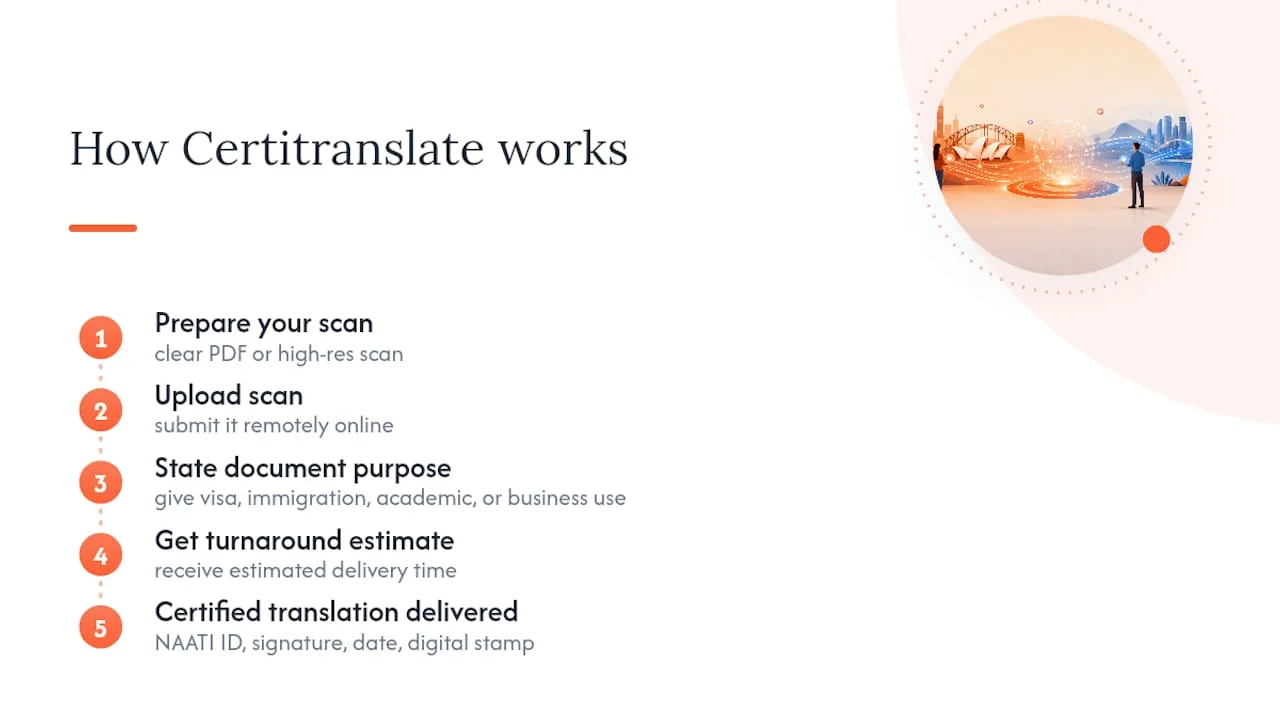
Certified translations by NAATI-certified translators include practitioner ID, signature, date, and digital stamp as expected by Home Affairs and universities. Typically, submitting involves uploading a clear PDF or high resolution scan and providing the purpose of the document to receive a turnaround estimate. Most personal and immigration documents move quickly, and you can check exactly what certified translation involves before you order if you want the full picture first.
If you’re preparing documents for a visa or citizenship application, the immigration document translation process guide walks through what to expect from submission to delivery. Ready to move? Upload your scan and get a quote today.
Where these requirements come from
The checklist above draws directly on published guidance rather than general assumptions, and each source covers a different part of the process.
- NAATI’s FAQ sets the standard for what must appear on a certified translation, including digital stamp acceptance.
- The Department of Home Affairs visitor visa guidance and Form 1300t explain when translator details, originals, and certified copies are required for migration and citizenship applications.
- AUSIT’s FAQ on personal document translation confirms remote scan submission is standard practice.
- TIS National’s Free Translating Service page outlines eligibility for newly settled migrants.
Check these directly if your situation involves an unusual document type or an overseas translator, since eligibility and exact requirements can shift between application categories.
This article is general information, not a substitute for advice from a qualified lawyer. Consult a qualified legal professional about your own circumstances before acting on anything here.
Sources
- Frequently Asked Questions – NAATI
- Applying for a visitor visa – Department of Home Affairs
- How do I get a personal document translated? – AUSIT